Cuemark
Teleprompter + recorder · Windows now, iPhone & Android next

The teleprompter only you can see.

Cuemark floats your script over Zoom, Teams, OBS and your own recordings, invisible to everyone watching. It moves when you speak, waits when you pause, and tells you after each take what to fix.

Free during the beta. The first 500 sign-ups get Premium for $49 for the first year. One email when the beta opens, no spam. Privacy

Free beta soonWindows 10 & 11English · Français · العربيةiPhone & Android coming
You
● Hidden from captureVoice · 1.0×
Lastquarter,oursupportteam
answered12,000tickets.
Thatistwiceasmanyasbefore.
Withthesameteam.
Everyanswergoesintoalibrary,
sothenextpersongetsitinseconds.
Your screen What viewers see
Drag the handle. Left is your screen. Right is what Zoom, Teams, OBS and your recording get.Windows 10 (2004+) and 11
ZoomMicrosoft TeamsGoogle MeetOBS StudioCuemark Recorder

Hidden from any app that captures your screen through Windows.

How it works

Most teleprompters show your words. Cuemark coaches how you say them.

Before you read, while you read, and after you read: three steps from script to a finished take.

01 · DIRECT

Your script, marked like a director would.

Paste a script and pick a style: social video, presentation or tutorial. Cuemark draws the delivery right on the words, so you know where to pause, what to stress and when to lift the energy.

  • Pauses, stressed words, pace, breaths and energy lifts
  • Margin notes that explain each choice
  • Accept, change or remove any mark with one click
Presentation style

slowLast quarter, our support team answered 12,000 tickets. That is twice as many as the year before, with the same team. ⚡So how did we do it? ∿We stopped answering the same question twice. fastEvery answer now goes into a shared library, and the next person gets it in seconds.

let the numbers landnumbers stick when stressedgive the question rooma breath, then the answerkeep it moving
Word stress pause∿ breatheslow downspeed up⚡ lift energy
02 · PERFORM

Read naturally. Nobody sees the script.

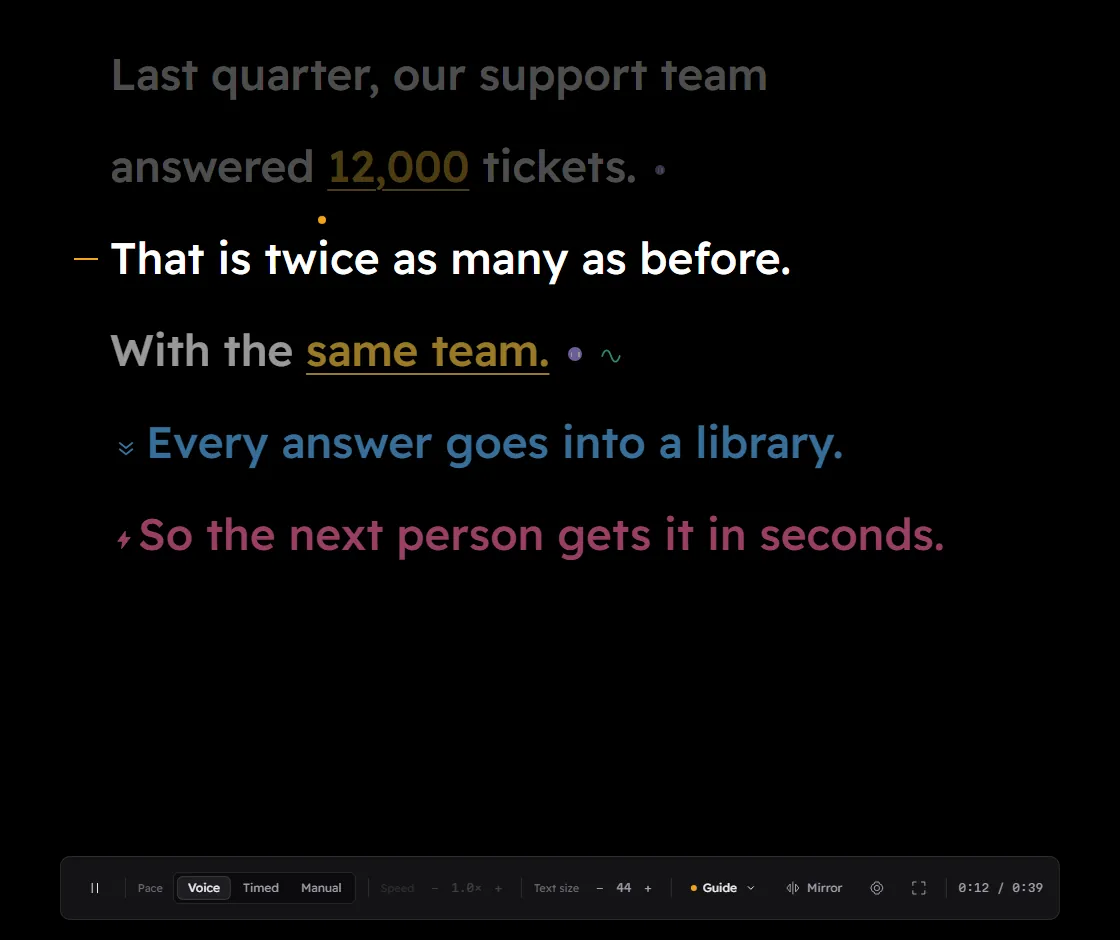
The prompter floats on top of everything while you present or record. It moves at your speaking pace, holds on every pause mark, and grows each stressed word as you reach it.
  • Hidden from screen sharing and recording
  • Voice, Timed or Manual pacing
  • Record screen, camera, both, or voice only
The Cuemark prompter during a recording: the current line is bright, stressed numbers are underlined in amber, pause dots follow sentence ends, and a badge says Hidden from capture.
03 · CHECK

Stop recording. Get notes, and a cleaner cut.

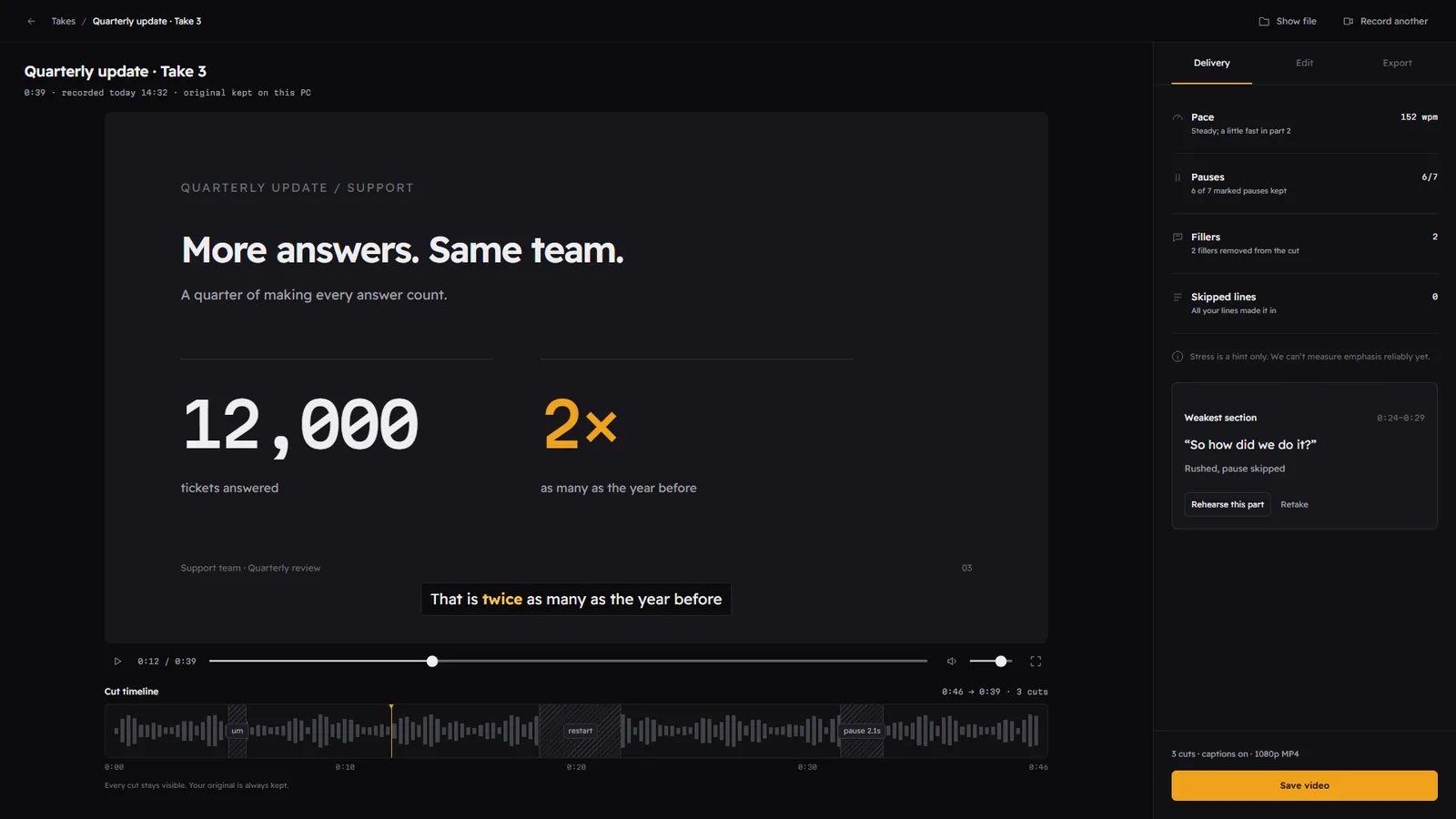
Speech recognition runs on your PC and lines your take up against your script. You see what worked, what to fix, and a version with the ums and restarts already cut.
  • Pace, pauses kept, fillers and skipped lines
  • Jump to your weakest section and retake just that part
  • Captions and exports for every platform
Take review with the video, a cut timeline, and a delivery panel showing 152 words per minute, 6 of 7 pauses kept, 2 fillers removed and no skipped lines.
152words per minute
6/7pauses kept
2fillers cut
0skipped lines
Cut timeline0:46 · 3 cuts

A filler, a false start and a long pause, found and cut on your PC. Every cut stays visible and your original is always kept.

Features

Everything between the script and the upload.

Invisible on capture

The prompter, notes and controls never show up in screen shares or recordings. Viewers see your slides and your face.

Moves when you speak

Voice mode scrolls while you talk and waits while you pause. Timed and Manual modes too.

Cue marks on your script

Pauses, stress, pace, breaths and energy, drawn right on the words. Free on-device rules, or the AI director in Premium.

Record screen, camera, both, or voice

Video or audio only, with your microphone and computer sound, a countdown, retakes, and recovery if anything crashes.

Feedback on every take

Pace in words per minute, pauses kept, fillers, skipped lines and your weakest section, with one click to retake it.

A take that edits itself

Fillers, false starts and long silences are cut automatically. Every cut stays visible; your original is kept.

Captions and exports

Styled captions, SRT files, and 16:9, 9:16 or 1:1 exports in MP4 or MOV.

English, French, Arabic, and more

Right-to-left scripts, cue rules and transcription in each language. More languages are coming.

Mirror and Notes modes

Flip text for a glass rig, or use a private deck of talking points when you speak freely.

Multilingual from day one

Speak English, French or Arabic.

Right-to-left scripts that read properly, cue rules written for each language, and on-device transcription for captions and feedback. Few teleprompters handle Arabic well. Cuemark was built for it from day one, and more languages are on the way.

Last quarter, we answered 12,000 tickets.

That is twice as many as before.

Private by design

Your recordings never leave your PC.

No cloud library

Takes, scripts and transcripts are saved in your Documents folder. No account is needed to record.

On-device speech

Transcription, captions, cuts and feedback run on your computer, even offline.

You choose what is sent

Only the script text, and only when you ask the AI director to mark it up. Never audio or video.

Why Cuemark

A teleprompter, plus the coach you never had.

Typical teleprompter appCuemark
Shows your scriptYesYes
Hidden from screen share and recordingSomeYes
Tells you where to pause and what to stressNoCue marks on every line
Records video and audioRarelyScreen, camera, both, or voice only
Feedback after each takeNoPace, pauses, fillers, skipped lines
Cuts the ums and restartsNoAutomatically, on your PC
Arabic and FrenchVariesBuilt in, right-to-left included

Comparing specific apps? See the best teleprompter apps for Windows.

Pricing

Free to read. Premium to direct.

Everything is free during the beta. Premium arrives with the public Microsoft Store launch.

Free

$0forever

No account, no time limit.

  • Prompter hidden from screen share and recording
  • Voice, Timed and Manual pacing
  • On-device cue marks
  • Record screen, camera, both, or voice only
  • Delivery feedback after every take
  • Automatic cuts and captions
  • 1080p exports with a small “Made with Cuemark” mark
Join the beta
7-day free trial

Premium

$5.83/ month

$69.99 billed yearly. Cancel any time.

  • Everything in Free
  • AI director: 60 script-minutes a month (about twenty 3-minute scripts)
  • No watermark
  • 4K exports, every format at once
  • Full sound clean-up
  • Script sync with iPhone and Android when they launch
Get the founding price

Founding offer: $49 for your first year of Premium. For beta testers and the first 500 people on the waitlist, and you keep that price when you renew.

Claim it

Prices in US dollars. The Microsoft Store sets local prices and taxes in other countries. Billing through the Microsoft Store.

FAQ

Questions, answered.

Is the prompter really invisible on Zoom, Teams and OBS?
Yes, on Windows 10 (version 2004 or later) and Windows 11. Cuemark asks Windows to leave the prompter, your notes and the controls out of every screen capture, so screen shares and recordings show what is behind them instead. That covers Zoom, Microsoft Teams, OBS Studio, Google Meet in the browser and Cuemark’s own recorder. Your camera still sees you, so place the prompter near your webcam to keep eye contact.
Does it scroll with my voice?
Voice mode moves the script while you are speaking and holds it when you stop, so you never chase the text and a pause never runs you off the page. It follows your pace rather than matching each word; word-by-word tracking is in development. Timed and Manual modes are there when you want them.
Is Cuemark free?
Yes. The invisible prompter, voice pacing, on-device cue marks, recording, delivery feedback, automatic cuts and captions are free, with 1080p exports that carry a small “Made with Cuemark” mark. Premium ($8.99 a month or $69.99 a year) adds the AI director, removes the mark, and unlocks 4K and full sound clean-up. Everything is free during the beta.
What does the AI director do?
It reads your script the way a director would and marks where to pause, which words to stress, where to breathe, and where to slow down or lift the energy, with a short note on why. You accept, change or remove each mark. Premium includes 60 script-minutes a month, about twenty 3-minute scripts. Free users get on-device rule-based marks.
Do my recordings get uploaded anywhere?
No. Recordings, scripts and transcripts are saved on your PC, and speech recognition runs on your PC. The only thing that ever leaves is the script text, when you ask the AI director to mark it up.
Which languages does it support?
English, French and Arabic at launch, including right-to-left scripts, cue rules in each language and on-device transcription for captions and feedback. More languages are on the way.
Is there a phone version?
Yes, on the way. Cuemark launches on Windows first, then comes to iPhone and Android. One Premium subscription will work on your PC and your phone, with your scripts synced between them.
Can I use it with a glass teleprompter rig, or without a script?
Yes to both. Mirror mode flips the text for beam-splitter glass. Notes mode gives you a private deck of talking points when you would rather speak freely than read.
When can I get it?
The private beta opens on the Microsoft Store for people on the waitlist first. The first 500 sign-ups get Premium for $49 for the first year, and keep that price when they renew.
Private beta · Windows

Read like a pro. Nobody sees the script.

Join the waitlist for the free beta on the Microsoft Store, and lock in the founding price before Premium launches.

What will you record? (optional)

Free during the beta. The first 500 sign-ups get Premium for $49 for the first year. One email when the beta opens, no spam. Privacy